Total Pageviews

Search This Blog

Showing posts with label challenges. Show all posts

Tuesday, March 22, 2011

Year-End Business

Well, I can't quite believe it, but we are at the end of our CAP season together!

After no responses to last week's Challenge, I think it's safe to say that everyone is pretty busy right now with year-end tasks. So this week, I won't be posting a challenge.

Rather, I ask that everyone participate in the discussion section of Glen's most recent post. What has been the primary focus of your work days during your internship?


We will, however, be announcing the WINNER!


With quality, creative submissions to nearly every challenge since she began, and a total of SIX wins..... Shona Bracken! Thank you for all of your hard work! You will be receiving an awesome prize before term-end.

Special thanks, and a mini-prize goes to Lyndsay Belair - with a total of FOUR challenge wins, and lots of other great subsmission.

Mini-prizes also for Glen Dufour and Matt Chamberlain, who have posted many interesting shared stories and discussion topics for us throughout the season.

I hope to work with many of you again in the Summer. There are great things in store!

On one last note, let's take a look at the success of our blog! Here are the stats from our final month.
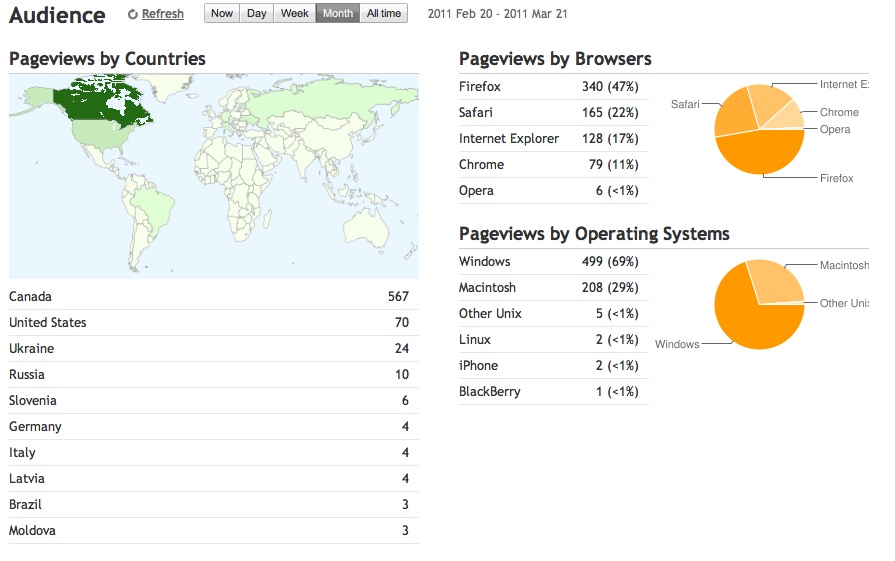


Great work gang!

Tuesday, March 15, 2011

Challenge # 2.12: An Opinion Piece

Thank you for last week's challenge submissions. Very light-hearted in the midst of everything going on in our world. The win goes to Lyndsay for her witty ad and digital editing skills!

As I finish giggling over the past two entries, I have realized that this will be our second-last challenge of the Winter Term.


I want to let you each seek out something you're interested in, and do up a little commentary piece on it. Seems kind of like schoolwork, but when it comes down to it, being able to stay informed and articulate about current technology-related developments and events is an important skill to take away from this job.

So, choose a topic, any topic, in our current technology world, that you find interesting, and write up a commentary/letter-to-the-editor-eque piece about it.

If you need any help getting started, try checking out something like the New York Times Technology Section, or a site like Engadget.

Time to let your bright minds shine! (Well, continue shining really, after all you've done this Term)!

Wednesday, March 9, 2011

Introducing The Mouse! (revolutionary new tool)


Tired of having to do stuff?


Having trouble turning lights on and off?


Do you wish you had a tool to help you with every aspect of your life?


Introducing the mouse!


The revolutionary new device that can do just about anything!


Use your mouse to


Tuesday, March 8, 2011

Challenge # 2.11: Humour Has It...

Thank you Shona, the winner of last week's challenge, for your awesome Reconnect Documentary Link! I know that Joanne saw the link and loved it - watch out for it maybe popping up elsewhere!

This week, we have a fun, less serious challenge.


Dan posted a video on his Facebook yesterday showcasing the difficulties some less-experienced technology-users may have identifying technology gadgets (i.e. a Wii remote, I-Pad, or GPS). If the technology hasn't been described to the audience via commercials or manuals, it truly can look like bizarre alien gear.

This week, post a picture of a technology gadget, and write up a humorous adverstisement description of an alternate use it could be mistaken for. Give it a name, etc. Really pitch it to us like it's an informercial!


The point of this exercise is to take the perspective of someone on the opposite side of the Digital Divide, with a funny spin.

Excited to see what hilarious things you come up with!

Wednesday, March 2, 2011

Tutorial Winner

Really, really impressed with the tutorials! Great job, all!
You are making it really hard for me to choose a winner... and I know this challenge took a lot of work. So, because there are only three of you, you ALL get a point in the Challenge roster!

Thank you so much for your participation.

Challenge response: Reconnect banner ad

Here is an animated banner I made for the website (www.spencerhouse.ca) to link to the movie preview:


Copy this code to embed it in your site or blog: <img border="0" height="0" src="http://c.gigcount.com/wildfire/IMP/CXNID=2000002.11NXC/bT*xJmx*PTEyOTkwOTA5MjUwNzMmcHQ9MTI5OTA5MDkzMTM*NSZwPTQ1NTkzMiZkPSZnPTEmb2Y9MA==.gif" style="height: 0px; visibility: hidden; width: 0px;" width="0" /><object data="http://files.bannersnack.net/app/swf2/EmbedPlayerV2.swf?hash_id=bc4388c3c345d9e70a336192b1833308&amp;watermark=1&amp;clickTag=null" height="250" id="embededBannersnackFlash_bc4388c3c345d9e70a336192b1833308" type="application/x-shockwave-flash" width="300"><param name="movie" value="http://files.bannersnack.net/app/swf2/EmbedPlayerV2.swf?hash_id=bc4388c3c345d9e70a336192b1833308&watermark=1&clickTag=null"> <param name="allowFullScreen" value="true"><param name="wmode" value="transparent"><param name="allowScriptAccess" value="always"></object>

Challenge response: Photoshop tutorial

Hi all,

I have just uploaded by tutorial to YouTube as  a part of last weeks challenge. It is a super-quick and painless tutorial of photoshop that briefly explains working with layers and masks. I made it with "Snapz Pro X" and then edited it in iMovie. In the future, I would like to use Adobe Captivate, which is a free program specifically designed for these types of video tutorials, but it is only compatible with really up-to-date versions of Mac/Windows.

I do not know why a small part of the top of the screen cut off when I converted it to imovie, still trying to figure that out.

EDIT: I have figured out why the screen cut off and have uploaded it now, so it should be easier to follow.

Tuesday, March 1, 2011

Keyboarding Tutorial

Hey guys,

Here's my youtube tutorial. It covers keyboarding and basic computer components.


Yes, I made the music myself. Beep beep beep beep beep beep beep beep.

Challenge # 2.10: Link It

The Tutorial Challenge was a huge success ! A great resource to have for our CAP sites. Consider making more if ever you're looking for something to do ! *Just waiting for the final postings to announce the winner*

This week, in spirits of the upcoming Documentary release, we want you to spread the word.


Create a visual (i.e. photo & text mix) link to the documentary page. www.hrcap.wordpress.com to display on your CAP site/community/blog homepage.

Very simple, very fun!

As always, post your products here before next Tuesday! (And make sure to display it as a link on your site)!

Thursday, February 24, 2011

Picnik for Seniors

Here's my submission for the challenge - first attempt at video-editing! I've had some questions here about photo-editing so I decided to make something for Picnik going over some common functions like red eye, cropping etc. It's directed more towards seniors but anyone who isn't familiar with more advanced programs like Photoshop or GIMP may find it useful.

Tuesday, February 22, 2011

Challenge # 2.9: Youtube Tutorial

Thanks to Matt, Glen, and Shona (her post is coming later today) for the Sketchup buildings! I admire your talents and patience... my buildings have always ended up looking like nightmarish rectangles. You all get a point on the Challenge scale!

On that note; all of Dan's tutorials have been very helpful for us amateur Sketchup-ers. Recording oneself complete a computer task is actually a genius idea.


So, for our next challenge, that's the goal! Record and edit a tutorial for our Youtube Channel.

It can be for any level of computer learning, any skill, any program, etc.

Use a free trial of your choice of Camtasia, Hypercam, or any other Video Capture program to record yourself in action. You don't need to worry about perfection, or getting it all in one take, because next you will be able to edit it.

Once you have your footage, e-mail me, and I will give you the sign-in info for our YouTube account. From there, you can clip, merge, and add text to your footage.

I really hope that this challenge takes on! It would be awesome to have some short, easy tutorials for training sessions up on our page!

Friday, February 18, 2011

First Creation with Sketch-up

Here is my first creation with sketch-up. It's my junior high school that I went to. I would have done my CAP site but street view was done when the old Empire Theatres was here so it looks very different. Maybe someday I'll take my own photos of the building and try to sketch it that way. It took me a couple hours to get used to the tools and make this. It wasn't too bad since it was only a couple rectangles and minor push and pull. This is addicting though - I'll think I'll definitely be doing more in the future (hopefully much better looking when I get practice!).

Tuesday, February 15, 2011

Cole Harbour Place

Hey all, here is something I whipped up, which is where my C@P Site is located, Cole Harbour Place.


And here's the adjacent Cole Harbour High School:

And finally the Pope John Paul XXIII Church in Cole Harbour:

All of the KMZ files for viewing in Google Earth can be found here.


Challenge # 2.8: Sketch-Up Your Site !

Points for all who participate!

As discussed on Saturday, Google Sketch-Up is a fun tool, and great resource for CAP.

It's pretty much a self-taught skill (one I haven't quite mastered), that is valuable to have.


So, your task this week, is to Sketch-Up your site and any other important locations in your community using Skins from Google Earth, and share them here!

Can't wait to see your artistry!

Monday, February 7, 2011

Capvertisement

Here is my script submission for orientation this week!

Objectives

To demonstrate how generations that didn’t necessarily grow up with computers are still able to learn and be part of a social community.

Materials
A C@P site/group of computers
Button up shirts, suspenders, a cane, trousers, grey wig, glasses

Cast Members
3 or 4 young people
3 or 4 seniors (or young person dressed as a senior)

Scene 1
A group of young people are all crowed around computers at a local C@P site. They are laughing and having a good time. Then a senior walks in, looking scared. One of the young people sees the scared senior and asks if they need any help. The senior asks if the computers are here for everyone. They say, of course! All the young people welcome the senior over to the group. They sit him or her down and show them how to use the computer.

Scene 2
The next scene cuts to a group of seniors socializing and having fun with computers. They are all happy and put their hands in the air and yell “yay!”

Friday, February 4, 2011

Challenge 2.7 response - c@p public service announcement

Hey!

Okay, here is my "idea" - I was looking at the media/marketing section on the nscap site and took some of the text from the brochure into the PSA. I thought it would be neat to use google maps/earth and zoom in on the different locations, so that's why I started that google map of all the regional C@P sites.

I downloaded this light little app called "camtasia" that records the screen so it can record a zoom-in of the map. I also used this online site called prezi.com that lets you make good-looking slideshows, so i screen recorded a slideshow and then added all of this together in iMovie.

The rough product looks like this:

The final version would be better cropped with a smoother transition.

EDIT: Apparently there is already a google earth map of the c@p sites here (needs google earth plug-in) This will save me a lot of work! (Thanks, Dan)

Tuesday, February 1, 2011

Challenge # 2.7: CAP-mercial

Well hello again, it's time for another weekly challenge!

But first, a big announcement! Congratulations to Laura, from Veith House! Your wonderful entry in the previous challenge has won your site a Flip-Cam to have and to hold (and use)! Arrangements will be made ASAP. Can't wait to see what Veith House is able to do with it - be sure to share with us here!

Thank you also to Matt and Lyndsay, who contributed! Your ideas for using the camera were A+ and we will have to see what we can do to make them happen as well! Lyndsay, your post actually reminded me of something I found and shared with the Interns in the Summer: "The Art of Analog Computing"

So, on to this week's Challenge! As you all know, Orientation Day is coming up on the 12th! One of our goals for this day is to make *at least* one group video to post on our YouTube account.


The idea is to do a little PSA or 'commercial' for the services CAP offers! This is opportunity for something both creative and funny!

Your challenge is to formulate an idea for the basic theme/characters/concept/props needed, etc. of the video! I will put a script together for us based on the winning submission, and we will produce it on the 12th!

Compose your idea how you please - just make sure it's uber creative and fun! Lights, Camera, CAPtion!

(The uses for the word CAP as filler are just endless..the joke will never get old to me...hahaha)

Saturday, January 29, 2011

Flip Cam me a Tutorial!

Here at Keshen Goodman we have a lot of seniors. I often teach them computer basics. Some things are harder than others… such as computer terms. They often get confused between desktop, trashcan, file, program, browser and taskbar. It can be overwhelming. It’s practically like a new language for them to learn. As I was teaching one day, I had a random idea. Wouldn’t it be nice to have a youtube video explaining some of the basics… but instead of a tutorial on the computer, using real world items to create it?


It may sound a little out there, but I wanted to take a video from above looking down onto a desk, have a little trash can, files, folders, and do a skit about, say, writing a document, and saving and dropping and draging it into a file in a folder. It sounds a little complicated, but I really think it would be neat to explain the terms like that! Some people might benefit from a different perspective of how a computer desktop works. I’m still not sure of how I’d pull this off, but think with a little help it would be a really neat idea!

Friday, January 28, 2011

Challenge Response

A flip cam would be a wonderful resource for the Veith House CAP site. The best reason for this that I can think of, would be to capture all the amazing stories that pass through here.

To provide a bit of background information, Veith House was the Halifax Protestant Orphanage beginning in 1867. It was destroyed in 1917 in the Halifax explosion, where all of the orphans and staff lost their lives. The orphanage was rebuilt and continued to operate as an orphanage until 1969, when it was renamed the Veith House Community Centre.

Since 1969, Veith House has provided a wonderful resource to the community of North End Halifax. On top of hosting a CAP site, it also provides a preschool, counselling, in-home parenting and advocacy services. On the third floor, it also hosts the Veith Street Gallery.

This building is beautiful and possesses a very rich history. The sense of community that can be felt within these walls is indescribable. People come here for all sorts of different reasons; all from unique backgrounds but still sharing a profound connection to the area.

A building that brings people together in such a way should be recognized and celebrated for the impact it has on the lives of families and community members. Many people are unaware of the existence of Veith House and the wonderful resources it provides. I've been lucky enough to have worked here for two years now, and each and every person I've met has had a story to tell that's affected me in some way.

As a CAP intern, I feel responsible to communicate everything Veith House has to offer to the public, via internet. Unfortunately, I haven't been able to do it much justice given the resources we have. If we had a flip cam, I could begin to actually show people exactly what this historic building means to the community.

As I've learned, there are many here who are interested in commenting on the building and the different ways in which they use it. This would be perfect for making short documentaries about community centres and the enormous effects they have on the people who use them. There are a number of things that go on at Veith House that could be filmed - community events, support group sessions, preschool trips and concerts. As well, there are a number of individuals who use the CAP site that would love to share their stories on why the site is important to them.

I'm sure we can all agree that showing is better than telling - and, as I mentioned, the real atmosphere of this building is something that can't be described.

Wednesday, January 26, 2011

Flippidy-do-da!

I thought the title was clever...

So what would my C@P Site do with a flip cam? Well, in the words of that woman from the Simpsons, "won't somebody please think of the children!". Right on, voice actress, one of the things that I'd like to do would be to use it with the kids. Particularly during the February/Canada Games Break, I'll have some time with the kids, and I'd like to do some sort of group project involving the whole "lights, camera, action!" thing. My thought was something sports/Canada related that the kids could be given at the end of the week.

Secondly, one thing that would not necessarily be during my season, but rather the next season (the summer). As some of you may know, we do kids day camps during the summer (in fact, all summer). We often have people come in (such as the reptile guy from an earlier post) and the domino man that we'd love to have footage of. We give DVDs out to the kids during Claymation camp, and it would be easy and fun to put those on as well.

Tying in with the last point is the other day camps that are done in Cole Harbour Place, such as the dance camp, which do performances that could be recorded and shared, would be particularly fun! One idea I had for this would be to pick a camper to be the "camera guy/gal" and let them be the one to actually take the video, or to take turns, so that they get the experience out of it.

There are also some less kid-oriented things which we could use the camera for, particularly in that we currently don't have a functioning digital camera! Although the flip doesn't (as far as I know), take stills, it is possible using the camera to take stills from a video, which would likely be all we needed.

One final thought that I'd like to do would be to create a sort of 360 degree view of our C@P Site for the website. I think it would be really cool and useful!

Those are a few things I'd like to do with it given the opportunity, but I'm sure there's a lot more out there to do!